Romeo and Juliet concept map
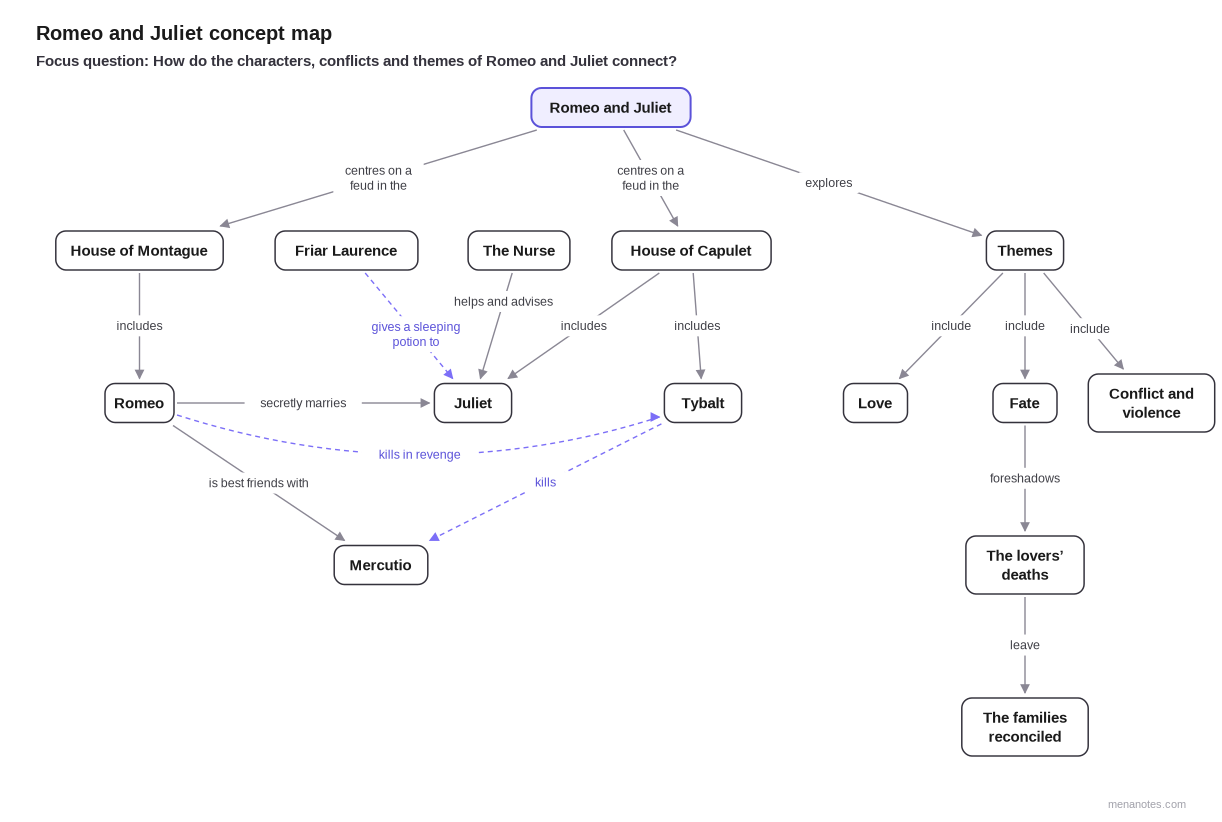
Shakespeare’s tragedy turns on a feud between two families in Verona. This map links the main characters to the families and to each other, then connects the plot to the play’s central themes.
Read the map as sentences
Every arrow is a proposition. Read aloud, the map says:
- Romeo and Juliet centres on a feud in the House of Montague
- Romeo and Juliet centres on a feud in the House of Capulet
- Romeo and Juliet explores Themes
- House of Montague includes Romeo
- House of Capulet includes Juliet
- House of Capulet includes Tybalt
- Romeo secretly marries Juliet
- Romeo is best friends with Mercutio
- Tybalt kills Mercutio
- Romeo kills in revenge Tybalt
- The Nurse helps and advises Juliet
- Friar Laurence gives a sleeping potion to Juliet
- Themes include Love
- Themes include Fate
- Themes include Conflict and violence
- Fate foreshadows The lovers’ deaths
- The lovers’ deaths leave The families reconciled
Romeo and Juliet: what the map shows
Romeo, a Montague, meets Juliet, a Capulet, at her family’s feast. Friar Laurence marries them in secret, hoping the match will end the feud. The Nurse, Juliet’s confidante, carries messages between them.
The turning point comes in Act 3: Tybalt, Juliet’s cousin, kills Mercutio, Romeo’s friend and a kinsman of the Prince, and Romeo kills Tybalt in revenge and is banished. To escape a forced marriage to Paris, Juliet takes the Friar’s potion, Romeo believes she is dead and poisons himself, and Juliet stabs herself when she wakes.
The Prologue calls them “star-crossed lovers”, setting up fate as a theme from the first lines. Love, fate and the violence of the feud drive the plot, and only the lovers’ deaths bring the two families to reconcile.
Common mistakes
- Mercutio is not a Montague; he is related to Prince Escalus and is Romeo’s friend.
- The play takes place over only a few days, which adds to the sense of haste.
Make it your own
Drawing the map yourself is where the learning happens. Start from the focus question, list the concepts first, then link them with your own words. A blank concept map template gives you the boxes; the concept map guide covers the method.
Make and edit this map in Mena on iPad
Mena is a canvas app for iPad, iPhone and Mac, free to start. Paste this map in, rearrange it, add your own notes and sketches, and turn concepts into flashcards.
Get Mena on the App Store- Copy this map as text.
- In a Mena board, open More tools in the toolbar, choose Diagram from Text and paste. Each concept becomes a shape and each linking phrase a connector label.
- Drag concepts around, rename linking phrases and draw your own cross-links. Connectors stay attached when you move a shape.
- Export the finished board as PNG, SVG or PDF.