Photosynthesis concept map
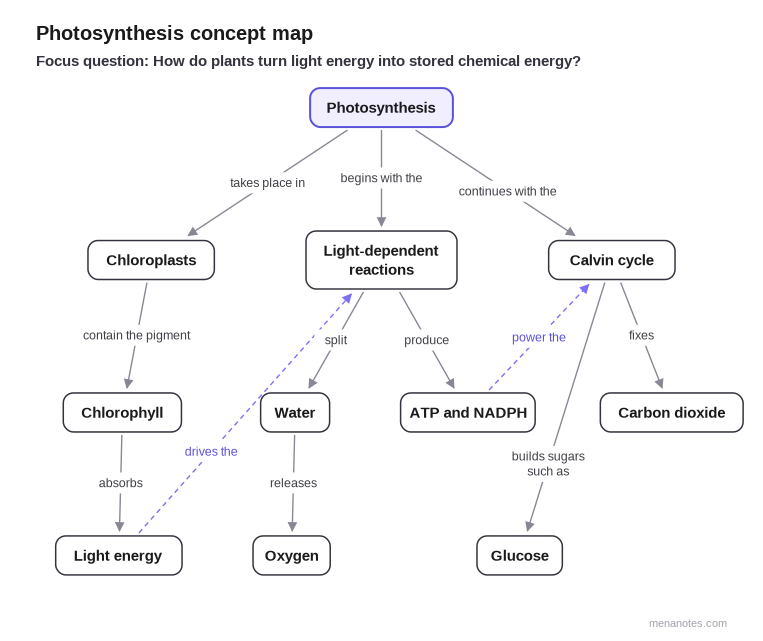
Photosynthesis is how plants, algae and some bacteria capture light energy and store it in sugar. This map follows the process in two stages, from the light that chlorophyll absorbs to the glucose the Calvin cycle builds.
Read the map as sentences
Every arrow is a proposition. Read aloud, the map says:
- Photosynthesis takes place in Chloroplasts
- Photosynthesis begins with the Light-dependent reactions
- Photosynthesis continues with the Calvin cycle
- Chloroplasts contain the pigment Chlorophyll
- Chlorophyll absorbs Light energy
- Light energy drives the Light-dependent reactions
- Light-dependent reactions split Water
- Water releases Oxygen
- Light-dependent reactions produce ATP and NADPH
- ATP and NADPH power the Calvin cycle
- Calvin cycle fixes Carbon dioxide
- Calvin cycle builds sugars such as Glucose
Photosynthesis: what the map shows
The overall equation is 6CO₂ + 6H₂O + light energy → C₆H₁₂O₆ + 6O₂. Everything on the map is a step inside that one line.
The light-dependent reactions run on the thylakoid membranes inside the chloroplast. Chlorophyll absorbs light, water is split, oxygen is released as a by-product, and the captured energy is stored in two carrier molecules, ATP and NADPH.
The Calvin cycle runs in the stroma, the fluid around the thylakoids. It uses ATP and NADPH to fix carbon dioxide from the air into a three-carbon sugar (G3P), which the plant uses to build glucose, starch and cellulose.
Common mistakes
- The oxygen plants release comes from water, not from carbon dioxide.
- Plants do not take their food from the soil. They make sugar from carbon dioxide and water; the soil supplies water and minerals.
Make it your own
Drawing the map yourself is where the learning happens. Start from the focus question, list the concepts first, then link them with your own words. A blank concept map template gives you the boxes; the concept map guide covers the method.
Make and edit this map in Mena on iPad
Mena is a canvas app for iPad, iPhone and Mac, free to start. Paste this map in, rearrange it, add your own notes and sketches, and turn concepts into flashcards.
Get Mena on the App Store- Copy this map as text.
- In a Mena board, open More tools in the toolbar, choose Diagram from Text and paste. Each concept becomes a shape and each linking phrase a connector label.
- Drag concepts around, rename linking phrases and draw your own cross-links. Connectors stay attached when you move a shape.
- Export the finished board as PNG, SVG or PDF.