Respiratory system concept map
The respiratory system moves air in and out of the lungs and exchanges gases with the blood. This map traces the airway down to the alveoli and links breathing movements to gas exchange.
Read the map as sentences
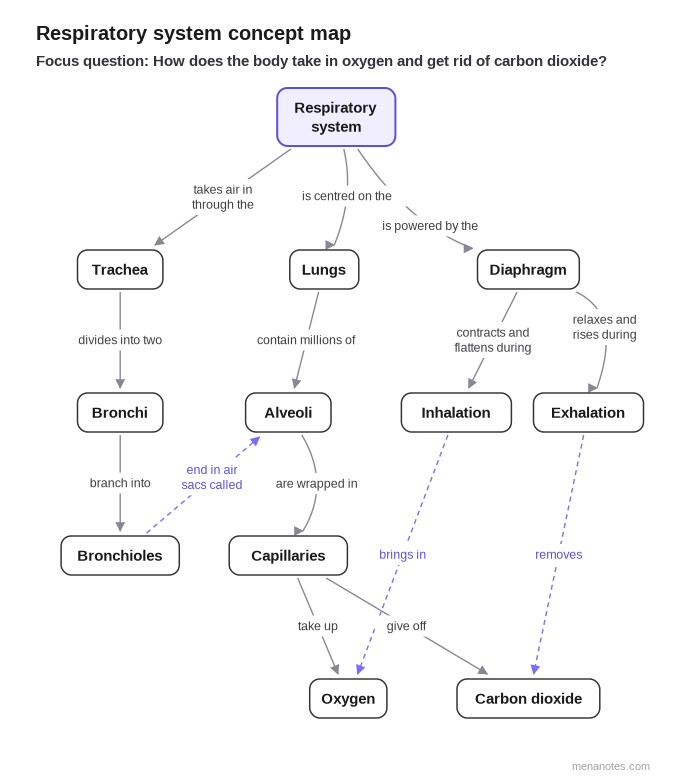
Every arrow is a proposition. Read aloud, the map says:
- Respiratory system takes air in through the Trachea
- Trachea divides into two Bronchi
- Bronchi branch into Bronchioles
- Bronchioles end in air sacs called Alveoli
- Respiratory system is centred on the Lungs
- Lungs contain millions of Alveoli
- Alveoli are wrapped in Capillaries
- Capillaries take up Oxygen
- Capillaries give off Carbon dioxide
- Respiratory system is powered by the Diaphragm
- Diaphragm contracts and flattens during Inhalation
- Diaphragm relaxes and rises during Exhalation
- Inhalation brings in Oxygen
- Exhalation removes Carbon dioxide
Respiratory system: what the map shows
Air travels down the trachea, which splits into two bronchi, one for each lung. These branch into thousands of bronchioles that end in alveoli, tiny air sacs with walls one cell thick.
Each alveolus is wrapped in capillaries. Oxygen diffuses from the air into the blood and carbon dioxide diffuses the other way, both moving down their concentration gradients. A huge surface area, thin walls and a constant blood supply keep exchange fast.
Breathing is driven by the diaphragm and the intercostal muscles between the ribs. When the diaphragm contracts and flattens, the chest volume rises, pressure falls and air flows in. When it relaxes, air is pushed out.
Common mistakes
- Breathing and respiration are different: breathing moves air, respiration releases energy in cells.
- Exhaled air still contains oxygen, about 16 percent compared with about 21 percent in inhaled air.
Make it your own
Drawing the map yourself is where the learning happens. Start from the focus question, list the concepts first, then link them with your own words. A blank concept map template gives you the boxes; the concept map guide covers the method.
Make and edit this map in Mena on iPad
Mena is a canvas app for iPad, iPhone and Mac, free to start. Paste this map in, rearrange it, add your own notes and sketches, and turn concepts into flashcards.
Get Mena on the App Store- Copy this map as text.
- In a Mena board, open More tools in the toolbar, choose Diagram from Text and paste. Each concept becomes a shape and each linking phrase a connector label.
- Drag concepts around, rename linking phrases and draw your own cross-links. Connectors stay attached when you move a shape.
- Export the finished board as PNG, SVG or PDF.