Immune system concept map
The immune system protects the body from pathogens such as bacteria and viruses. This map links its fast, general first response to the slower, targeted response that builds lasting memory.
Read the map as sentences
Every arrow is a proposition. Read aloud, the map says:
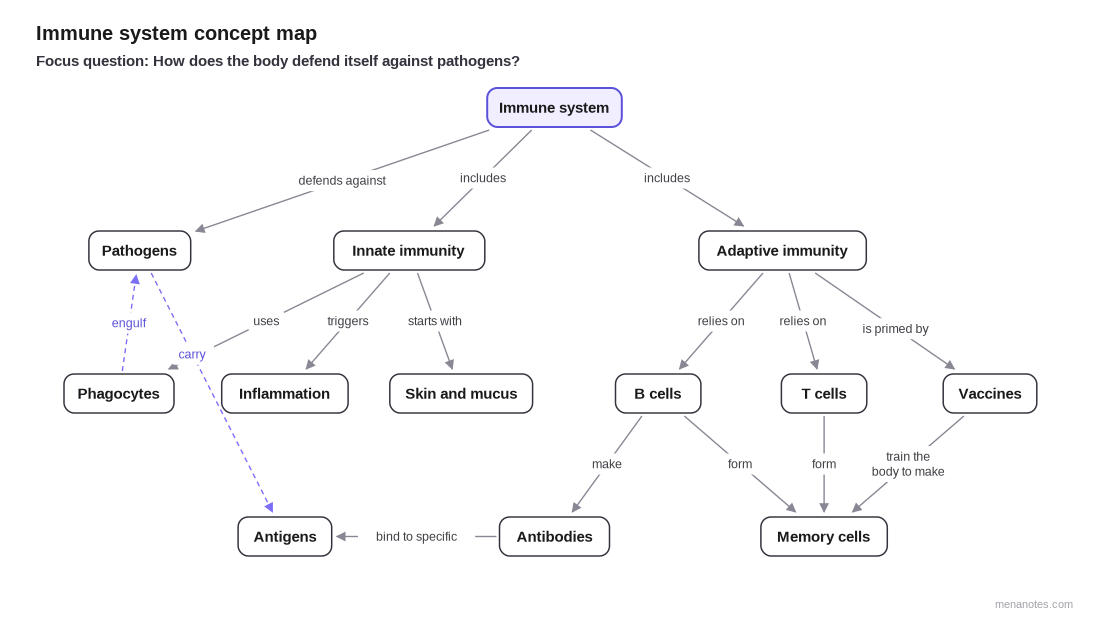
- Immune system defends against Pathogens
- Immune system includes Innate immunity
- Immune system includes Adaptive immunity
- Innate immunity uses Phagocytes
- Innate immunity triggers Inflammation
- Innate immunity starts with Skin and mucus
- Adaptive immunity relies on B cells
- Adaptive immunity relies on T cells
- Adaptive immunity is primed by Vaccines
- Phagocytes engulf Pathogens
- Pathogens carry Antigens
- B cells make Antibodies
- Antibodies bind to specific Antigens
- B cells form Memory cells
- T cells form Memory cells
- Vaccines train the body to make Memory cells
Immune system: what the map shows
Innate immunity responds the same way to any invader, within minutes to hours. Skin and mucus block entry, inflammation brings blood and immune cells to the site, and phagocytes engulf and digest pathogens.
Adaptive immunity is slower the first time but specific. B cells make antibodies that bind to one antigen, a molecule on the pathogen’s surface. T cells help coordinate the response, and cytotoxic T cells kill infected body cells.
Both B and T cells leave memory cells behind, so a second infection is met faster and harder. Vaccines use this: a harmless form of an antigen trains the immune system before the real pathogen arrives.
Common mistakes
- Antibiotics kill bacteria, not viruses, and they are not part of the immune system.
- Antibodies are proteins made by B cells; antigens are the molecules they recognise.
Make it your own
Drawing the map yourself is where the learning happens. Start from the focus question, list the concepts first, then link them with your own words. A blank concept map template gives you the boxes; the concept map guide covers the method.
Make and edit this map in Mena on iPad
Mena is a canvas app for iPad, iPhone and Mac, free to start. Paste this map in, rearrange it, add your own notes and sketches, and turn concepts into flashcards.
Get Mena on the App Store- Copy this map as text.
- In a Mena board, open More tools in the toolbar, choose Diagram from Text and paste. Each concept becomes a shape and each linking phrase a connector label.
- Drag concepts around, rename linking phrases and draw your own cross-links. Connectors stay attached when you move a shape.
- Export the finished board as PNG, SVG or PDF.