Electric circuits concept map
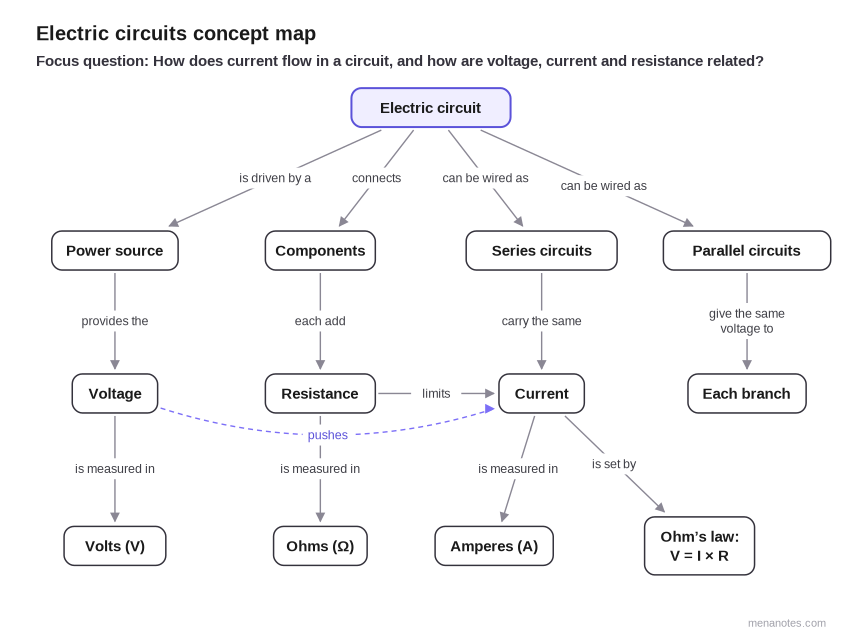
An electric circuit is a closed loop that lets charge flow from a power source through components and back. This map links the three key quantities, their units and how series and parallel wiring changes them.
Read the map as sentences
Every arrow is a proposition. Read aloud, the map says:
- Electric circuit is driven by a Power source
- Electric circuit connects Components
- Electric circuit can be wired as Series circuits
- Electric circuit can be wired as Parallel circuits
- Power source provides the Voltage
- Components each add Resistance
- Series circuits carry the same Current
- Parallel circuits give the same voltage to Each branch
- Voltage pushes Current
- Resistance limits Current
- Current is set by Ohm’s law: V = I × R
- Voltage is measured in Volts (V)
- Resistance is measured in Ohms (Ω)
- Current is measured in Amperes (A)
Electric circuits: what the map shows
Current is the rate of flow of charge, measured in amperes. Voltage (potential difference) is the push that drives it, measured in volts. Resistance is how strongly a component opposes the current, measured in ohms.
Ohm’s law links them: V = I × R. For a fixed resistance, doubling the voltage doubles the current. It holds for ohmic conductors at a constant temperature; filament lamps and diodes do not follow it.
In a series circuit there is one path, so the current is the same everywhere and the voltage is shared between components. In a parallel circuit each branch gets the full voltage and the currents in the branches add up to the total.
Common mistakes
- Current is not used up by a bulb; the same current flows back to the source.
- Adding resistors in parallel lowers the total resistance, because it adds more paths.
Make it your own
Drawing the map yourself is where the learning happens. Start from the focus question, list the concepts first, then link them with your own words. A blank concept map template gives you the boxes; the concept map guide covers the method.
Make and edit this map in Mena on iPad
Mena is a canvas app for iPad, iPhone and Mac, free to start. Paste this map in, rearrange it, add your own notes and sketches, and turn concepts into flashcards.
Get Mena on the App Store- Copy this map as text.
- In a Mena board, open More tools in the toolbar, choose Diagram from Text and paste. Each concept becomes a shape and each linking phrase a connector label.
- Drag concepts around, rename linking phrases and draw your own cross-links. Connectors stay attached when you move a shape.
- Export the finished board as PNG, SVG or PDF.