Digestive system concept map
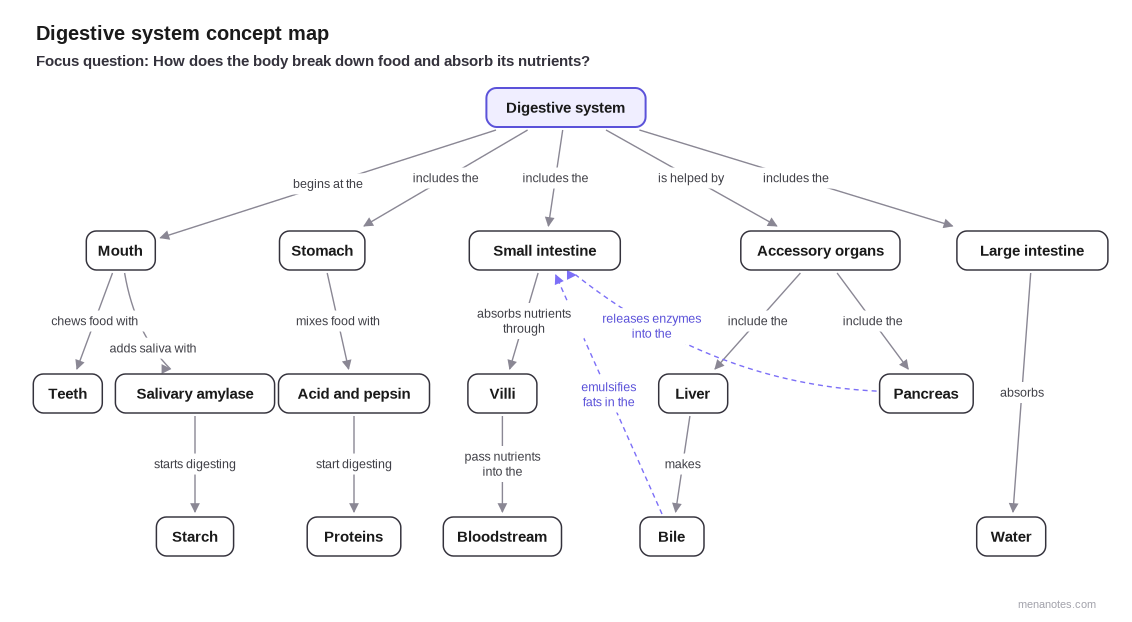
Digestion breaks large food molecules into small ones the blood can absorb. This map follows food along the digestive tract and shows where each organ, enzyme and secretion does its part.
Read the map as sentences
Every arrow is a proposition. Read aloud, the map says:
- Digestive system begins at the Mouth
- Digestive system includes the Stomach
- Digestive system includes the Small intestine
- Digestive system is helped by Accessory organs
- Digestive system includes the Large intestine
- Mouth chews food with Teeth
- Mouth adds saliva with Salivary amylase
- Salivary amylase starts digesting Starch
- Stomach mixes food with Acid and pepsin
- Acid and pepsin start digesting Proteins
- Small intestine absorbs nutrients through Villi
- Villi pass nutrients into the Bloodstream
- Accessory organs include the Liver
- Accessory organs include the Pancreas
- Liver makes Bile
- Bile emulsifies fats in the Small intestine
- Pancreas releases enzymes into the Small intestine
- Large intestine absorbs Water
Digestive system: what the map shows
Digestion is both mechanical and chemical. Teeth and the churning stomach break food into smaller pieces; enzymes break the molecules themselves. Salivary amylase starts on starch in the mouth, and pepsin, working in the stomach’s hydrochloric acid, starts on proteins.
Most digestion and absorption happen in the small intestine. Bile from the liver, stored in the gallbladder, emulsifies fats into small droplets, and pancreatic enzymes (amylase, proteases and lipase) finish breaking down carbohydrates, proteins and fats. Villi and microvilli give the lining a huge surface area for absorbing nutrients into the blood.
The large intestine absorbs water and salts from what is left and forms faeces.
Common mistakes
- Bile is not an enzyme. It emulsifies fat so lipase can work faster.
- The stomach absorbs very little food; the small intestine does almost all of it.
Make it your own
Drawing the map yourself is where the learning happens. Start from the focus question, list the concepts first, then link them with your own words. A blank concept map template gives you the boxes; the concept map guide covers the method.
Make and edit this map in Mena on iPad
Mena is a canvas app for iPad, iPhone and Mac, free to start. Paste this map in, rearrange it, add your own notes and sketches, and turn concepts into flashcards.
Get Mena on the App Store- Copy this map as text.
- In a Mena board, open More tools in the toolbar, choose Diagram from Text and paste. Each concept becomes a shape and each linking phrase a connector label.
- Drag concepts around, rename linking phrases and draw your own cross-links. Connectors stay attached when you move a shape.
- Export the finished board as PNG, SVG or PDF.