Circulatory system concept map
The circulatory system moves blood around the body, delivering oxygen and nutrients and carrying wastes away. This map connects the heart, the three kinds of blood vessel and the parts of blood itself.
Read the map as sentences
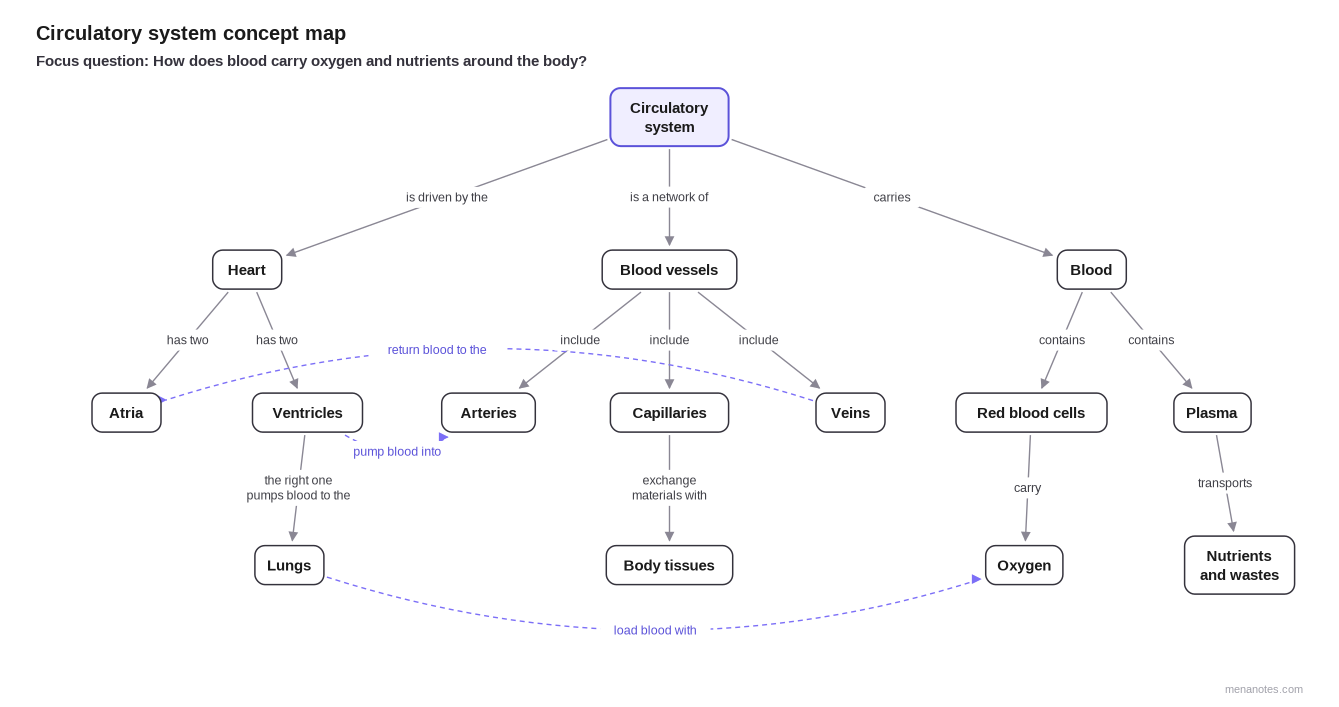
Every arrow is a proposition. Read aloud, the map says:
- Circulatory system is driven by the Heart
- Circulatory system is a network of Blood vessels
- Circulatory system carries Blood
- Heart has two Atria
- Heart has two Ventricles
- Ventricles pump blood into Arteries
- Blood vessels include Arteries
- Blood vessels include Capillaries
- Blood vessels include Veins
- Veins return blood to the Atria
- Capillaries exchange materials with Body tissues
- Ventricles the right one pumps blood to the Lungs
- Lungs load blood with Oxygen
- Blood contains Red blood cells
- Blood contains Plasma
- Red blood cells carry Oxygen
- Plasma transports Nutrients and wastes
Circulatory system: what the map shows
Humans have a double circulation. The right side of the heart pumps blood to the lungs to pick up oxygen; the left side pumps oxygen-rich blood to the rest of the body. Atria receive blood and ventricles pump it out, with valves keeping the flow one way.
Arteries carry blood away from the heart under high pressure and have thick, elastic walls. Veins carry it back at low pressure and have valves. Capillaries are one cell thick, which lets oxygen, glucose and wastes pass between blood and tissues.
Red blood cells carry oxygen bound to haemoglobin. Plasma carries dissolved nutrients, carbon dioxide, hormones and urea. White blood cells and platelets, not shown, defend against infection and help blood clot.
Common mistakes
- Not every artery carries oxygen-rich blood: the pulmonary artery carries oxygen-poor blood to the lungs.
- Deoxygenated blood is dark red, not blue.
Make it your own
Drawing the map yourself is where the learning happens. Start from the focus question, list the concepts first, then link them with your own words. A blank concept map template gives you the boxes; the concept map guide covers the method.
Make and edit this map in Mena on iPad
Mena is a canvas app for iPad, iPhone and Mac, free to start. Paste this map in, rearrange it, add your own notes and sketches, and turn concepts into flashcards.
Get Mena on the App Store- Copy this map as text.
- In a Mena board, open More tools in the toolbar, choose Diagram from Text and paste. Each concept becomes a shape and each linking phrase a connector label.
- Drag concepts around, rename linking phrases and draw your own cross-links. Connectors stay attached when you move a shape.
- Export the finished board as PNG, SVG or PDF.